


Please follow these instructions for making a payment to your student account:
Students
- Login to Self-Service using your student ID and PIN
- Click on Student Services Menu
- Select View/Pay Student Account
- Select Pay
- Select Checkout
- Select your preferred method of payment (electronic check or foreign currency)
Authorized Users
- The student must first add you as an authorized user. Please see the CASHNet FAQs for details on adding an authorized user.
- Login to CASHNet using your parent PIN and password
- Select Pay
- Select Checkout
- Select your preferred method of payment (electronic check or foreign currency)
Paying with ACH (e-check)
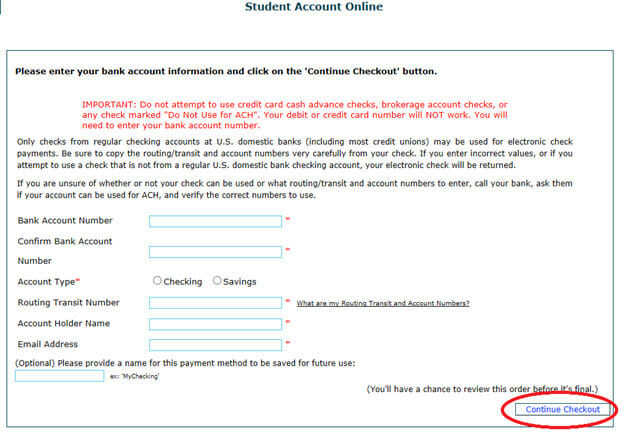
- Select Pay with Electronic Check
- Type in your bank account and routing numbers within their respective fields
- Select an account type (checking or savings)
- Provide the account holders first and last name
- Provide an email address to ensure delivery of a receipt. There is an optional field in which you can name and save your payment method for future use (if you do not wish you save your payment method, skip this step)
- Select Continue Checkout
- Review the following page for accuracy (Please note: Incorrect routing or bank account numbers will result in a returned check, and a $20 fee)
- Select Submit Payment
- On the following page, you will be alerted whether your transaction was approved
A receipt will be emailed to the address provided, and you will also have the option to obtain a printable receipt
Paying with Foreign Currency (Transact International Wire Transfer)
- Transact International Payments offers international students and their parents a secure and seamless way to pay for tuition and fees in your currency of choice. Without leaving the student portal, you can quickly and conveniently make an international payment from over 160 countries, using more than 130 currencies.
For more information, check out the video – https://youtu.be/0sZYj98_6AM?si=TB6PCicFXAtPpdr-